
Artillery SideWinder X2
- Klipper Configuration
- Octoprint backup archive
- Ultimaker Cura configuration
- Octoprint specific configuration
- Filament set up
- Klipper firmware update (Printer & ADXL345 accelorometer)
- OctoKlipper: Auto-reconnect printer after power on
- Resources / Links
Octoprint backup archive
[2025-01-02] ASWX2-backup-20240208-181211.zip
Klipper Configuration
- Klipper installation documentation
- Klipper printer.cfg file
- Klipper macros.cfg file
Ultimaker Cura configuration
Cura Printer configuration
| Printer | Extruder |
|---|---|
 |
 |
Start G-code
; Octolapse Plugin required parameters
; Script based on an original created by tjjfvi (https://github.com/tjjfvi)
; An up-to-date version of the tjjfvi's original script can be found
; here:  https://csi.t6.fyi/
; Note - This script will only work in Cura V4.2 and above!
; --- Global Settings
; layer_height = {layer_height}
; smooth_spiralized_contours = {smooth_spiralized_contours}
; magic_mesh_surface_mode = {magic_mesh_surface_mode}
; machine_extruder_count = {machine_extruder_count}
; --- Single Extruder Settings
; speed_z_hop = {speed_z_hop}
; retraction_amount = {retraction_amount}
; retraction_hop = {retraction_hop}
; retraction_hop_enabled = {retraction_hop_enabled}
; retraction_enable = {retraction_enable}
; retraction_speed = {retraction_speed}
; retraction_retract_speed = {retraction_retract_speed}
; retraction_prime_speed = {retraction_prime_speed}
; speed_travel = {speed_travel}

START_PRINT BED_TEMP={material_bed_temperature_layer_0} EXTRUDER_TEMP={material_print_temperature_layer_0}
End G-code
END_PRINT
Print profiles
Octoprint specific configuration
Bed Visualizer plugin configuration

G28
BED_MESH_CALIBRATE
@BEDLEVELVISUALIZER
BED_MESH_OUTPUT
Filament set up
PLA
| Brand | Filament desc | Printing temp | Build Plate temp | Retractation Distance |
|---|---|---|---|---|
| Geeetech | Black | 200°C | 60°C | 0.75mm |
| Geeetech | White | 200°C | 60°C | 0.75mm |
| Geeetech | Silk Silver | 205°C | 60°C | 0.75mm |
PETG
| Brand | Filament desc | Printing temp | Build Plate temp | Retractation Distance |
|---|---|---|---|---|
| Geeetech | -- | -- | -- | -- |
Klipper firmware update
Last update
Last update done: 2024-09-04
Installed version: commit 08a1c9f12760ee6d89db2b82e76c7d93453212db
Printer
Printer preparation
-
Power off the printer
-
Unplug the electrical wall socket
-
Unplug the USB cable labelled
OPERATIONfrom printer -
Set the top switch to
UPDATEposition
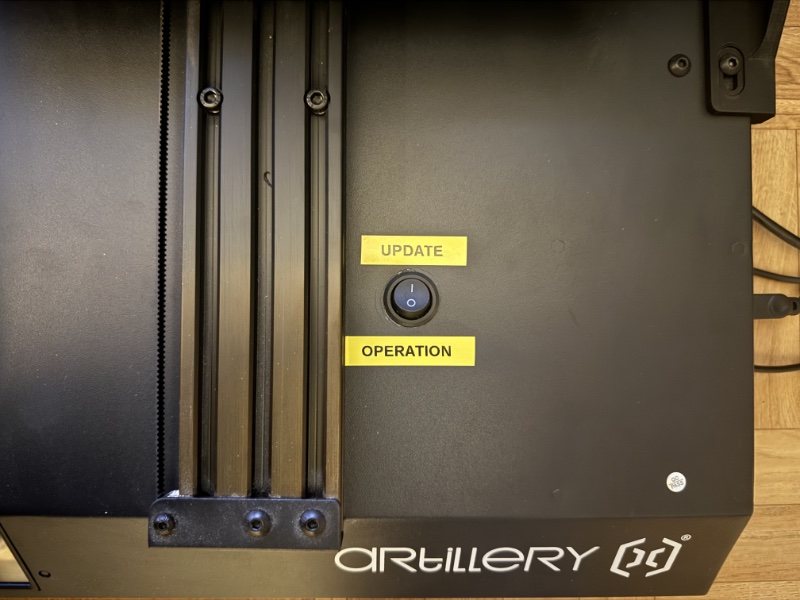
-
Plug the USB cable labelled
UPDATEto the printer

Firmware build and update
-
SSH to the ASWX2 Raspberry
-
Stop Klipper service
sudo service klipper stop
- Browse to Klipper directory:
cd ~/klipper
- Pull the last version of the Klipper firmware from Github:
git pull
- Clean up working directory before building firmware
make clean
- Check the firmware build configuration
make menuconfig

- Build the firmaware:
make
- Check printer's Ruby board is in DFU mode and can be updated
lsusb

-
Note the Ruby board device ID. In example above:
ID: 0483:df11 -
Flash the new firmware to the printer's Ruby board using the above device ID:
make flash FLASH_DEVICE=0483:df11

- Restart Klipper service
sudo service klipper start
- Check Klipper service is properly restarted
sudo service klipper status

Switch back printer to operation mode
-
Unplug the USB cable labelled
UPDATEfrom printer -
Set the top switch to
OPERATIONposition
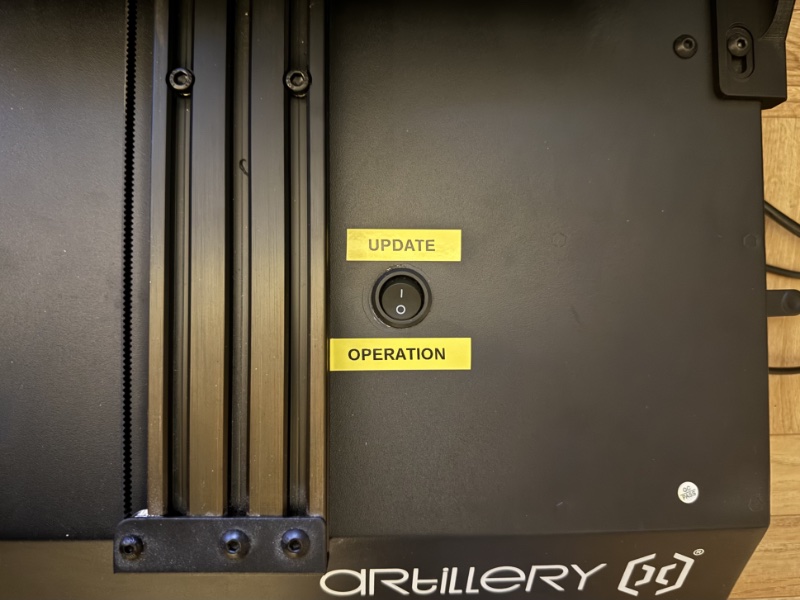
-
Plug the USB cable labelled
OPERATIONto the printer -
Plug the electrical wall socket

ADXL345 accelorometer
Software prereqiusites
Note that resonance measurements and shaper auto-calibration require additional software dependencies not installed by default. First, run on your Raspberry Pi the following commands:
sudo apt update
sudo apt install python3-numpy python3-matplotlib libatlas-base-dev libopenblas-base
Details on Klipper documentation
Firmware configuration and build
- Configure the firmaware:
cd ~/klipper
make clean
make menuconfig

- Build the firmware:
make
Firmware flash
-
Set the ADXL345 board in DFU mode by plugin it to the USB cable while maintaining the switch down
-
Check that the board is actually in DFU mode
lsusb

- Flash the firmware
make flash FLASH_DEVICE=2e8a:0003
Once flashed, the board will automatically reboot and goes back in operation mode.
OctoKlipper: Auto-reconnect printer after power-on
Source by Arnav Jain.
Start off by accessing Octopi using ssh.
Then create the 98-klipper.rules file in the /etc/udev/rules.d/ folder:
ssh octoprint
sudo touch /etc/udev/rules.d/98-klipper.rules
Retreive idVendor and idProduct for the Klipper MCU:
- Retrieve Klipper MCU ID
lusb

- Retrieve
idVendorandidProductusing the Klipper MCU ID
lsusb -v -d 1d50:614e | grep id

Then add the following text into the 98-klipper.rules file just created:
- Edit the
98-klipper.rulesfile
sudo nano /etc/udev/rules.d/98-klipper.rules
- Add text (remove the
0xat the begining of the IDs)
## rule to restart klipper when the printer is connected via usb
SUBSYSTEM=="usb", ATTRS{idVendor}=="1d50", ATTRS{idProduct}=="614e", ACTION=="add", RUN+="/usr/bin/sudo -u pi /bin/sh -c '/bin/echo RESTART > /tmp/printer'"
Finally, re-load the udev rules:
sudo udevadm control --reload-rules
Resources / Links
- Runout sensor bracket SIDEWINDER X2 by LeLudoLAb - Thingiverse
- Schéma pinout Artillery Ruby v1.2 (Genius Pro, Sidewinder X2, Hornet)
- How to install Klipper on ASWX2 - List of links (Shaarli)
- [SW X2] Renforts axe Z - Tutoriels et améliorations pour Artillery - Forum pour les imprimantes 3D et l'impression 3D
- [Tuto] Remplacer 3DTouch Artillery par un vrai BLTouch - Tutoriels et améliorations pour Artillery - Forum pour les imprimantes 3D et l'impression 3D
- Améliorations Sidewinder à imprimer
- Aide et ressources en français pour imprimantes 3D Artillery