

172 lines
5.2 KiB
Markdown
172 lines
5.2 KiB
Markdown
# Creality Ender 3
|
|
|
|
1. [Octoprint backup archive](#octoprint-backup-archive)
|
|
2. [Ultimaker Cura configuration](#ultimaker-cura-configuration)
|
|
3. [Print profiles](#print-profiles)
|
|
4. [Filament set up](#filament-set-up)
|
|
5. [Raspberry Pi 4 / Octoprint case](#raspberry-pi-4--octoprint-case)
|
|
|
|
# Octoprint backup archive
|
|
|
|
[2024-02-08] [Ender3-backup-20240208-205005.zip](octoprint-cfg-bkp/Ender3-backup-20240208-205005.zip)
|
|
|
|
# Ultimaker Cura configuration
|
|
|
|
## Cura Printer configuration
|
|
|
|
| Printer | Extruder |
|
|
|---------|----------|
|
|
|  |  |
|
|
|
|
## Start G-code
|
|
|
|
```
|
|
; Octoprint's Octolapse plugin required G-code
|
|
; Script based on an original created by tjjfvi (https://github.com/tjjfvi)
|
|
; An up-to-date version of the tjjfvi's original script can be found
|
|
; here: https://csi.t6.fyi/
|
|
; Note - This script will only work in Cura V4.2 and above!
|
|
; --- Global Settings
|
|
; layer_height = {layer_height}
|
|
; smooth_spiralized_contours = {smooth_spiralized_contours}
|
|
; magic_mesh_surface_mode = {magic_mesh_surface_mode}
|
|
; machine_extruder_count = {machine_extruder_count}
|
|
; --- Single Extruder Settings
|
|
; speed_z_hop = {speed_z_hop}
|
|
; retraction_amount = {retraction_amount}
|
|
; retraction_hop = {retraction_hop}
|
|
; retraction_hop_enabled = {retraction_hop_enabled}
|
|
; retraction_enable = {retraction_enable}
|
|
; retraction_speed = {retraction_speed}
|
|
; retraction_retract_speed = {retraction_retract_speed}
|
|
; retraction_prime_speed = {retraction_prime_speed}
|
|
; speed_travel = {speed_travel}
|
|
|
|
; Ender 3 Custom Start G-code
|
|
G92 E0 ; Reset Extruder
|
|
G28 ; Home all axes
|
|
G1 Z2.0 F3000 ; Move Z Axis up little to prevent scratching of Heat Bed
|
|
G1 X0.1 Y20 Z0.3 F5000.0 ; Move to start position
|
|
G1 X0.1 Y200.0 Z0.3 F1500.0 E15 ; Draw the first line
|
|
G1 X0.4 Y200.0 Z0.3 F5000.0 ; Move to side a little
|
|
G1 X0.4 Y20 Z0.3 F1500.0 E30 ; Draw the second line
|
|
G92 E0 ; Reset Extruder
|
|
G1 Z2.0 F3000 ; Move Z Axis up little to prevent scratching of Heat Bed
|
|
G1 X5 Y20 Z0.3 F5000.0 ; Move over to prevent blob squish
|
|
```
|
|
|
|
## End G-code
|
|
|
|
```
|
|
G91 ;Relative positioning
|
|
G1 E-2 F2700 ;Retract a bit
|
|
G1 E-2 Z0.2 F2400 ;Retract and raise Z
|
|
G1 X5 Y5 F3000 ;Wipe out
|
|
G1 Z10 ;Raise Z more
|
|
G90 ;Absolute positioning
|
|
|
|
G1 X0 Y{machine_depth} ;Present print
|
|
M106 S0 ;Turn-off fan
|
|
M104 S0 ;Turn-off hotend
|
|
M140 S0 ;Turn-off bed
|
|
|
|
M84 X Y E ;Disable all steppers but Z
|
|
```
|
|
|
|
# Print profiles
|
|
|
|
* [Standard Quality - Arc Welder](cura-profile/Ender3%20-%20Standard%20Quality%20-%20Arc%20Welder.curaprofile)
|
|
* [Low Quality - Arc Welder](cura-profile/Ender3%20-%20Low%20Quality%20-%20Arc%20Welder.curaprofile)
|
|
* [Super Quality - Arc Welder](cura-profile/Ender3%20-%20Super%20Quality%20-%20Arc%20Welder.curaprofile)
|
|
|
|
# Filament set up
|
|
## PLA
|
|
|
|
| Brand | Filament desc | Printing temp | Build Plate temp | Retractation Distance |
|
|
|-----------|---------------|---------------|------------------|-----------------------|
|
|
| Geeetech | Black | 210°C | 60°C | 0.75mm |
|
|
| Geeetech | Silk Silver | 210°C | 60°C | 0.75mm |
|
|
|
|
## PETG
|
|
|
|
| Brand | Filament desc | Printing temp | Build Plate temp | Retractation Distance |
|
|
|-----------|---------------|---------------|------------------|-----------------------|
|
|
| Geeetech | -- | -- | -- | -- |
|
|
|
|
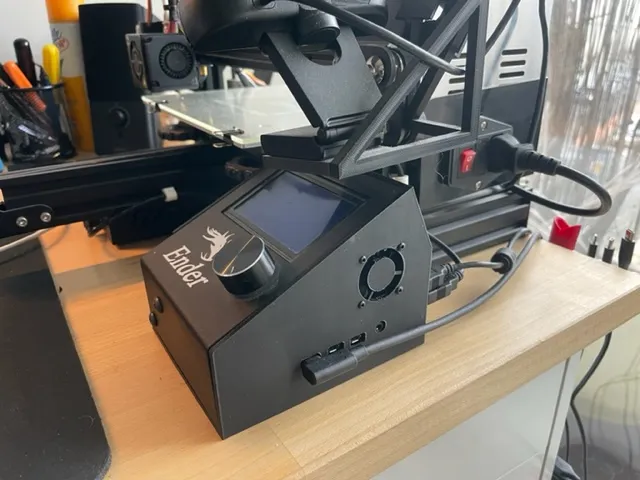
# Raspberry Pi 4 / Octoprint case
|
|
|
|
Final result :
|
|
|
|
|
|
|
|
## 3D model for case printing
|
|
|
|
[Link to Printable](https://www.printables.com/model/1008828-creality-ender-3-station-lcd-raspberry-pi-4)
|
|
|
|
## Activate button and led support
|
|
|
|
### Full tutorial
|
|
|
|
[Raspberry Pi Power-Up and Shutdown with a Physical Button](https://embeddedcomputing.com/technology/open-source/development-kits/raspberry-pi-power-up-and-shutdown-with-a-physical-button)
|
|
|
|
|
|
### TL;DR
|
|
|
|
#### Add button support
|
|
|
|
1. Edit `/boot/config.txt` file.
|
|
2. Add line ` dtoverlay=gpio-shutdown`.
|
|
|
|
Final result:
|
|
```
|
|
[...]
|
|
|
|
[all]
|
|
# enable raspicam
|
|
start_x=1
|
|
gpu_mem=128
|
|
|
|
# Simple button on/off
|
|
dtoverlay=gpio-shutdown
|
|
```
|
|
|
|
#### Add LED support
|
|
|
|
1. Edit crontab
|
|
```
|
|
#> crontab -e
|
|
```
|
|
|
|
|
|
2. Add the line
|
|
```
|
|
@reboot raspi-gpio set 4 op dh
|
|
```
|
|
|
|
Final result:
|
|
```
|
|
# Edit this file to introduce tasks to be run by cron.
|
|
#
|
|
# Each task to run has to be defined through a single line
|
|
# indicating with different fields when the task will be run
|
|
# and what command to run for the task
|
|
#
|
|
# To define the time you can provide concrete values for
|
|
# minute (m), hour (h), day of month (dom), month (mon),
|
|
# and day of week (dow) or use '*' in these fields (for 'any').
|
|
#
|
|
# Notice that tasks will be started based on the cron's system
|
|
# daemon's notion of time and timezones.
|
|
#
|
|
# Output of the crontab jobs (including errors) is sent through
|
|
# email to the user the crontab file belongs to (unless redirected).
|
|
#
|
|
# For example, you can run a backup of all your user accounts
|
|
# at 5 a.m every week with:
|
|
# 0 5 * * 1 tar -zcf /var/backups/home.tgz /home/
|
|
#
|
|
# For more information see the manual pages of crontab(5) and cron(8)
|
|
#
|
|
# m h dom mon dow command
|
|
@reboot raspi-gpio set 4 op dh
|
|
``` |